Purchasing
The Yellow Cluster Business Office staff are happy to assist with any purchases needed to aid your work with the university. To handle purchases, we utilize PrePurchasing, a system that tracks PI approvals on all purchasing and reimbursement requests. Please enter the PrePurchasing system and fill out a PrePurchasing order for your request. You can find instructions for how to create a PrePurchasing order on our PrePurchasing Training Guide page. See a brief overview of the PrePurchasing process below:
- Requesters submit a PrePurchasing order for the goods or services they need, including what account should be charged for the purchases.
- PrePurchasing orders are reviewed and approved by account owners and our business office/finance team.
- Once the PrePurchasing order is fully approved, Business Office Staff initiate the purchase differently depending on the type of purchase.
There are a few ways that purchases can be handled depending on the type of purchase:
Purchasing Computers, Laptops, Tablets, etc.
All IT or tech purchases need to be directed to the IT department. You can visit their purchasing page for more information.
Software & Cloud-Based Services Purchasing:
All software and cloud-based services REQUIRE a Vendor Risk Assessment (VRA) approval from Campus IT. Please visit the VRA Website: https://lsit.ucdavis.edu/vendor-risk-assessment-vra. Once the request has been approved, L&S IT will move forward with the purchasing process.
Purchasing Postage/Shipping
University employees are able to utilize AggieShip to pay for business-related postage and shipping costs. By accessing the AggieShip portal you can input addresses, account numbers, and delivery instructions to generate a shipping label that is charged directly to the department.
Aggie Enterprise Catalog Purchasing
Many items from vendors like Amazon, Office Depot, VWR, and Fisher Scientific can be purchased directly via Aggie Enterprise Catalogs. Provide links to items you would like purchased on the PrePurchasing request and the business office staff can order it for you.
Click here for Aggie Enterprise Window Shopping Instructions.
Reimbursements
Travel & Entertainment reimbursement requests should be submitted through PrePurchasing well before the 60-day deadline, after which they will considered taxable income. Find more information about our T&E policy on our Travel and Entertainment page.
Purchases of items not related to travel, such as office supplies and professional memberships, are considered professional expense reimbursements. With the exception of membership expenses, paying for these out of pocket are discouraged, as they are considered unauthorized purchases. Please request for your business office to make any professional expense purchase on your behalf, especially if the purchases are frequent or regular.
There is a $499 dollar limit on professional expense reimbursements.
Purchasing Card
Purchasing cards are available to pay for subscriptions, memberships, and supplies that aren't available via Aggie Enterprise Catalog purchasing. Please submit a purchasing request in the PrePurchasing system with a detailed description of what you need purchased, and a staff member with a purchasing card will assist you.
Purchase Order (PO)
Occasionally, a PO is needed to pay for goods/services. If your purchase meets any of the following criteria, it requires a purchase order:
- Purchase of services (guest speakers, data, professional development, etc.)
- Total dollar amount is over $4,999.99
- Any agreement with terms and conditions requiring a signature
Please note that processing POs may take up to 4-6 weeks to be approved by the university's Procurement & Contract Services. If you think your purchase will need a PO, please obtain a written quote from the vendor and submit your request through PrePurchasing as soon as possible. Make sure to upload the vendor quote to the request. Please expect 3-5 business days for APO/PO processing in the Business Office.
PrePurchasing Purchase Training Video
Tips for PrePurchasing purchase requests!
Select Purchasing if this request is asking us to purchase something.

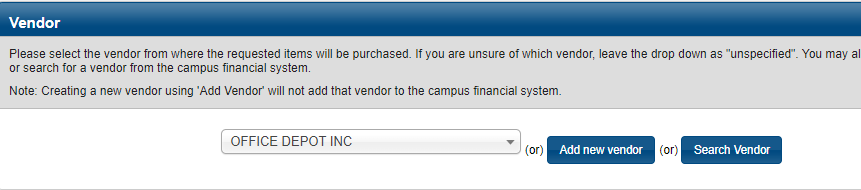
Select the vendor from the drop-down or select search vendor to find and select them.
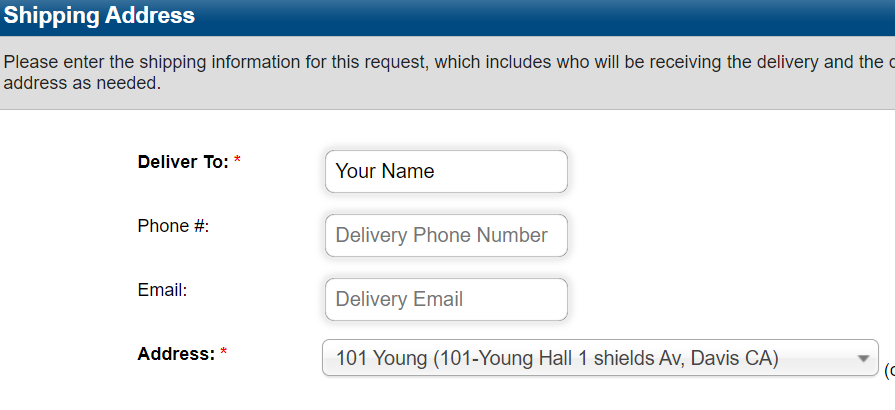
Put down your name and business office for the shipping address.